>

Buy Microsoft Office Ultimate 2007!

October 23, 2007

Keeping Your (Windows Based) Computer Secure:

In today’s world you can do just about everything online. You can pay your bills, make banking transaction, you can have entire savings accounts at online banks. You can look and apply for jobs, apply for business licenses, and even order dinner to be delivered.

While all of this is incredibly convenient, it does put a lot of personally information out in the open and can be a risk. And while companies that allow you to manage your account online do everything they can to protect your data, if your home computer gets compromised, then nothing any of the company's does will help. So here are a few tips to keeping your computer nice and safe.

  1. Make sure you have a good anti-virus software installed. There are several to choose from, some , like AVG, are free. Others like Norton Anti-Virus and my favorite Kaspersky can be purchased. No matter which anti-virus you choose, be sure to keep it up to date. Remember that when you are buying an anti-virus, you are really buying a subscription to their updates, so at the end of the year, you need to renew that subscription. An updated anti-virus is key to maintaining a secure computer.
  2. In addition to an anti-virus, a good piece of anti-spyware/adware software is good to have. I recommend using Adaware or Spybot S&D. The difference between a virus and adware/spyware is how it propagates and its purpose. Each require a different method of removal, although
  3. Turn on your firewall. Windows XP and Vista both include a built in firewall, which is good for most home users. You can purchase more advanced ones, but like most things, the more features it has, the more complicated and can be and the easier it is to mis-configure.
  4. Always have a password on your user account. Many people think that because it is their home computer, there is no reason to have a password. But the problem is, if there is no password, people can connect remotely and will immediately have access to do what they please on your computer since there is no username/password for them to figure out.
  5. Always change the default password on everything. If there is no default password, set a password (windows XP has a built in administrator account with no password by default, be sure to set one)
  6. Use strong passwords. A good password will be 8+ characters long, include letters, numbers and special characters like @, #, $, %.
  7. Update your software. No one is perfect, so when software is released there are still lots of bugs and security holes in it. Be sure to download the security updates as they come out. In windows you do this by using “windows update” or “Microsoft update” which can be found under all programs in your start menu.
  8. Be smart about email. Don’t just open attachments from people that you have never heard from, don’t reply to that guy in Nigeria who wants to give you $30m. Ignore those nude photos of whatever pop star is in the new lately. Emails like this are only around to scam you. Don’t fall for it.
  9. Don’t click on those nice flashy banners people have on their website saying you won money or some awesome prize. They are also SPAM. Many of those links will lead you to another page and then download some spyware onto your computer so they can keep popping up advertisements.
  10. Just about everything online, like in life, that seems too good to be true, is. Use your common sense.

Bookmark this post:
StumpleUpon DiggIt! Del.icio.us Yahoo Technorati Reddit Google

Potential Points of Failure

One of the most important steps in creating a good security scheme is to minimize the number of points of failure. What is a point of failure? A point of failure is any point in a process in which the procedures in place can break down and cause a failure; essentially, they are weaknesses.

Points of Failure in Online Transactions:

In a recent review I wrote on Mint.com , I mentioned many of these points of failure, and because of the number of them, I became concerned with the overall security of the product. This does not only go for Mint.com, this goes for every process and every procedure we use in day to day business, I use Mint.com in this example only because I have wrote about it recently and it deals with a very important subject; your money.

The standard way people use online banking is they log in to their banks website, and thats it. So the process looks something like this:
Persons Home Computer -> Internet -> Bank Web Servers -> Bank Database Servers -> Internet -> Bank Live Transaction Servers

As you can see there are about 6 points of failure. What this means, is that if any one of these points is compromised, there is a potential to lose data.

When using an application like Mint.com the process looks like this:

Persons Home Computer -> Internet -> Mint.com Web Servers -> Internet -> Yodlee Servers -> Internet -> Bank Web Servers -> Bank Database Servers -> Internet -> Bank Live Transaction Servers

As you can see, the number of points of failure has now gone up to 10. I addition to the points of failure increasing the potential loss is also increased. The reason for this is because in the original method, if any of the steps after your home computer are compromised, you only lose the integrity of that single bank. In the method using Mint.com, if the steps after your home computer, but before the Yodlee server to your bank are compromised, you potentially compromise all accounts that you are using the application to track.

In both scenarios, your home computer is typically going to be the easiest to compromise, and the one that holds the most amount of your personal data. So in either case the risk will be the same. If someone compromises your home computer, they can just collect the passwords/usernames for all of your accounts. Your home computer is also the most likely to be attacked, the reason for this is because home computers are low risk targets, and an attack can be as simple as sending an email with a virus attached. All the attacker needs is to have the user open the attachment. Home users don't invest much into security typically, but a large company like Mint.com invests a lot into their security, and have staff monitoring for these types of activities, so the risk is significantly greater for the attacker should they go after a large target like Mint. The reward is also potentially greater, but the skill required to pull it off would be much higher. With all these factors the likely hood of a breach is relatively low on Mints side, but pretty high on your home computer.


Points of Failure on Home Computers and Networks:


Similar to the points of failures in online transactions, home computers have points of failures with in them. For instance, every user account on your computer could be considered a potential point of failure, because each one presents a point of attack for someone trying to crack a password or find an account with no password.

Another potential point of failure is your home wireless router (if you are using one). A large percentage of people who buy wireless routers don't know how to configure them properly and don't take the time to secure them. Because of this, anyone within range of the signal can not only gain access to the network (and potentially to all computers on it) but can gain access to the interface on the router as well.

If a person were to gain access to your routers interface, they could set it to use a server the attacker has set up as your DNS server. What this means, is every time you try and get to a web page, it will check with his server where that page is located on the internet. If the attacker were to set it up so every time you try and go to your banks website, it takes you to a clone of it that he has set up on his server, he can then collect your username/password for that site, and you probably wouldn't notice for a while since he could make it give a generic error saying the site is down once you submit the username and password. Most people will let that go for a few days if they don't suspect any problems. A similar attack could be preformed by sending you an official looking email and have the links point to a rouge site the attacker has set up (this is called phishing, and is probably the most commonly used email attack)


As you can see, these potential points of failure are both common and dangerous. In many cases the old saying "keep it simple" can help you prevent having the excess points of failures. Don't use more equipment and connections then necessary. If you don't need a wireless router at home, then don't get one. If you don't need 10 accounts on your computer, delete the ones that aren't used. And always do the best you can to keep your computer secure.

Bookmark this post:
StumpleUpon DiggIt! Del.icio.us Yahoo Technorati Reddit Google

October 22, 2007

Outlook 2007 doesnt work with Word 2003

So last week my boss decided we should upgrade our CEO to Outlook 2007, but he didn't want to upgrade the entire suite just yet because that would be too much change at a given time. I agreed or CEO isn't the greatest with change so I went a head and installed Outlook 2007. He really liked it. He enjoyed the new interface and the new features, but he did have one complaint. His auto correct/replace didn't work any more.

Here is why. When you are editing an email in outlook, it actually uses Microsoft word to do the work, the reason for this is MS Word has a much larger tool set then the one built into outlook (outlook does have its own for those that don't have word, but its not so good). Unfortunately, Outlook 2007 cannot use word 2003 for this. So what happens is you get stuck either with Outlooks word processing engine, or with Outlook trying to use word 2003 which it can't.

The fix was easy, install word 2007. Its not that big of a deal, but something to be aware of if you decide you want Outlook 2007 (because its awesome) but dont want to buy the whole office suite.

Bookmark this post:
StumpleUpon DiggIt! Del.icio.us Yahoo Technorati Reddit Google

October 20, 2007

CompUSA Using Social Networks?

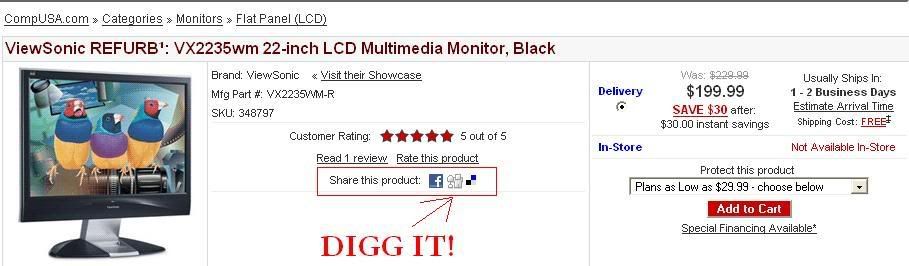
So it looks like CompUSA is jumping on the Social Network Bandwagon and are now placing links to Digg, Facebook, and Del.icio.us on all of their products so you can share them with your friends. It amazes me just how much clout sites like Digg have, they literally can bring a server to its knees with traffic generated by user views. Very cool.


Photo Sharing and Video Hosting at Photobucket

Bookmark this post:
StumpleUpon DiggIt! Del.icio.us Yahoo Technorati Reddit Google

Off Topic... National Health Care

I know this has nothing to do with technology, and is about as far off from my normal blog postings as you can get, but it’s my blog so I get to write whatever I feel like.

One of the biggest topics (aside from the war in Iraq) that the Presidential Candidates have to deal with is the idea of nation health care. Movies like Sicko portray the US Health Care System as inadequate and sub-bar.

Maybe it is because I have lived a health and lucky life. I have had no serious illnesses, no major injuries, and no extended hospital stays, so I have never dealt with an "inadequate" health care system. I remember going to the emergency room a few times, once for a gash on my arm that I needed to get stitches for, another because I had a bad case of tonsillitis and my throat and swelled up and it was hard to breath. Both times I was treated very quickly. My doctors have always been nice when I have gone in for physicals, or just being ill in general. I tore tenants in my hand, and they took care of me, I have a bad knee and Gout and I have always been taken care of.

In addition to this, my Mom has had several extended hospital stays because of severe back injury she sustained, and because of this needed several surgeries. They took good care of her in the Hospital, and the medical bills were taken care of by the state (she was injured while working a state job).

In fact, I don't know anyone who has had a horrible experience at the doctors or at a hospital. So for me, I just don't see this inadequate health system.

So maybe I have been getting this good treatment because I have always had health insurance. My dad is in a union with great benefits, so I got those until I was 21. But I had double coverage for several years because every company I have ever worked for has given me health insurance. Is this a rare thing? I mean I was 16 working at Blockbuster and even they offered me health insurance (and a number of other good benefits like tuition reimbursement). My current Jobs (yes I have 2) both offer health insurance. Heck my primary job offers 3 different types of coverage you can choose from. 2 are free and one costs me 12 dollars a month. (I picked the $12/month one because it allows me to see any doctor when ever I want for a huge variety of things as opposed to selecting a single "primary care" doctor who I would have to see) If I want to add my girlfriend on to my plan I can. You heard me right; we don't have to be married, just living together. That will cost me an extra $150/month I believe. But its great coverage. The only people I know who don't have health insurance are just lazy and don't have jobs. (Or have crappy part time fast food jobs). And in reality, if you are an adult, working a crappy part time fast food job, you need to take a look at your life and do better.

So what benefit would National Health care have for me? None. I would pay more taxes, so other people could get "free" medical. Why should I have to pay more so others can milk a government system because they are too damned lazy to work (welfare proves this over and over again). People in places like Canada who do have a national health care system still need to get extra insurance because their system doesn't cover everything good private insurance does. So it’s not like my company will stop providing health insurance, and then give me a raise which would then balance out the higher taxes. So really, all national health care will do is take more money from me to help people I don't know and who may not even need the help and are just lazy.

Don't get me wrong, I have nothing against helping those who really need help. I donate a significant amount of money to charities that I choose to support (usually ones that help fund education and medical research). I also work for a non-profit (where I take a lower salary then I would require from a larger for profit company) because I believe in the work they do and I want to be a part of that. So this isn't about not wanting to help people, it’s about being forced to help people and having no control over it.

The only national health care system I am willing to support would be one focused on children. Where a child would be qualified to receive health care up until age 18. Once they are 18, they are on their own. The reason for this is because a child doesn't ask to be borne, and should have to suffer because they have shitty parents who can’t get a job. If you can't get a job, you shouldn't be having a kid. And no, there is no excuse for not having a job, work a burger king if you have to, but you better damn well have a job. (Obviously there are exemptions to this like those who are disabled but they can get Medicare/Welfare) When you are 18, you can get your own job and your own health care. And don't give me that crap about being in school and not being able to work. I work 2 full time jobs AND still go to school, so it can be done (and it isn't that hard.)

It seems the people I hear complaining the loudest are those who just don’t have health insurance, here is what you do. Go get a job that provides it, or get a private healthcare provider. If your job doesn’t provide health care, or you just can’t afford it, then its time to get another job (a second one even) that will give you the extra cash so you can afford it.

Bookmark this post:
StumpleUpon DiggIt! Del.icio.us Yahoo Technorati Reddit Google